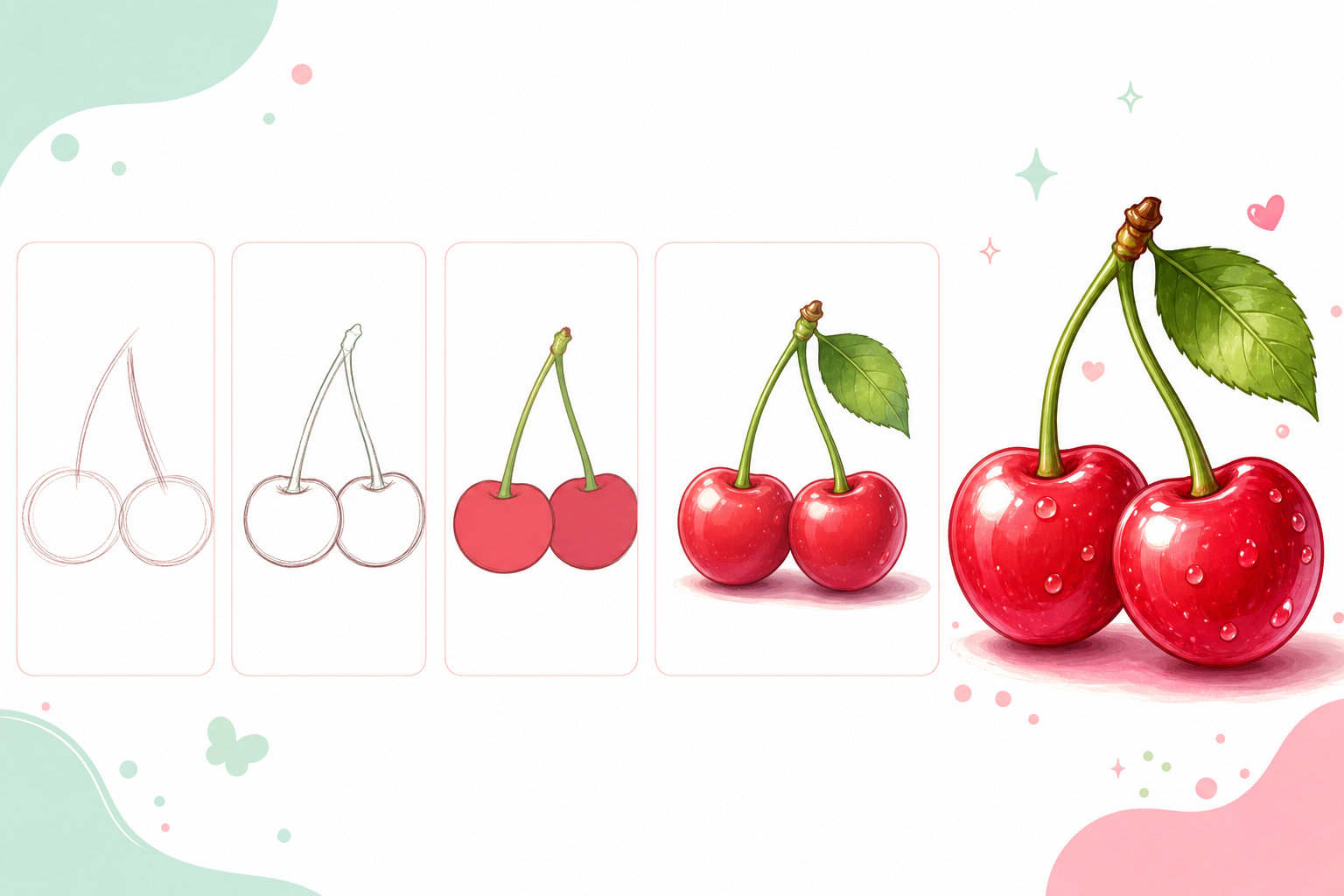
This beginner-friendly Procreate tutorial shows how to draw a pair of cherries with simple shapes, soft color layers, and polished highlights. It is designed for iPad artists who want a fresh fruit illustration practice project.
Step 1: Sketch the Basic Shape
Start with a loose sketch. Keep the shape simple and avoid small details at this stage. Focus on the overall silhouette first.
Step 2: Clean the Outline
Create a new layer above the sketch and draw a cleaner outline. Use smooth, confident strokes so the fruit feels soft and natural.
Step 3: Add the Base Color
Place your color layer under the line art. Fill the fruit with deep pink-red or cherry red. Keep the first color pass flat and simple.
Step 4: Paint Shadows and Gradients
Add a new layer for soft shadows. Use gentle gradients to make the fruit feel round. Build color slowly instead of using one heavy shadow.
Step 5: Add Details
Draw two curved stems and one leaf. Add darker red near the bottom of each cherry, then paint bright highlight spots on the upper side.
Step 6: Finish With Highlights
Add small bright highlights on the side facing the light. A few soft highlights can make the fruit look glossy and fresh.
Beginner tip: cherries look shiny when the highlight is small, bright, and placed on the same side of both fruits.
Drawing fruit is a great way to practice clean shapes, color control, and soft Procreate shading.